
Tools++
The compilers we are developing for Mann Versus Zombies
Includes
| VBSP++ | Higher map limits (brushes, planes, vertexes) and better stability |
|---|---|
| VVIS++ | Orders of magnitude faster performance |
| VRAD++ | Quicker compiles, new lighting features |
| BSPZIP++ | Multi-threaded compression |
| StudioMDL++ | New macro syntax, higher limits, more useful warnings |
Download



Installation
The ++ tools are now fully standalone. Extract the contents anywhere you want, such as onto your Desktop.

Then point your apps at the tools:

   Hammer -> Options -> Build Programs -> BSP executable   -> vbsp++
   Hammer -> Options -> Build Programs -> VIS executable   -> vvis++
   Hammer -> Options -> Build Programs -> RAD executable   -> vrad++
   Hammer -> Options -> Build Programs -> MDL executable   -> studiomdl++
   Packing tool (CompilePal, bspzipgui, ...)               -> bspzip++
   Crowbar -> Set Up Games -> Model Compiler               -> studiomdl++

Optionally, add the included "tools_plusplus.fgd" FGD file into Hammer's game configuration
Tools -> Options -> Game Configurations -> click Add beside Game Data files

Supported games:
- Garry's Mod
- All Valve Source 1 games (the ++ compilers will try autodetect BSP settings based on appid in gameinfo.txt)
- Sourcemods on old or new SDK 2013
- Insurgency (requires "-lightmapformat rgbea" in VRAD)

Unsupported games may work by adjusting options such as "-bspformat", "-lightmapformat", "-staticpropformat"
Showcase

Changelog
- Reduces brushes and brushsides usage of the map by 10-30% (MAX_MAP_BRUSHES, MAX_MAP_BRUSHSIDES)
	- Note: this reduction will be applied once the map exceeds the limit
- Reduces vertex usage of the map by 10-30% (MAX_MAP_VERTS)
	- Note: this reduction will be applied once the map exceeds the limit
	- You can also use the new "-cullverts" parameter to always reduce verts even if the limit isn't exceeded
- Automatically reduces planes usage of the map up to 40% if limit is hit (MAX_MAP_PLANES)
	- If plane limit is exceeded, VRAD++ must be used or lighting will be broken
- No t-junction limit
- No detail prop limit
- Raised overlay limit to 8192 and internal entity limit to 65536
- Increased maximum switchable lights from 32 to 96
- "-leaktest" is now enabled by default, i.e. stops compile on leaks
	- Added "-noleaktest" to disable this behavior
- Added appid mounting in gameinfo.txt
- Added support for mounting custom shaders in mods
- Added support for custom $surfaceprops on clip brushes
- Added support for compiling 4-way blends (for games that support it)
- Added support for reading model vertex formats from newer games (CS:GO)
- Added func_detail_blocker (like newer VBSPs)
- Added -blocksize (default is 1024)
	- Useful to compute visibility faster on open, large maps like surf (I recommend 2048)
	- Using a higher blocksize also reduces your vertex count, useful to circumvent vertex limit
- Added -allowdynamicpropsasstatic (allows any props to used as static props)
	- Note that some props might work right with this, particularly props that aren't compiled with "$staticprop"
- Added per-prop ambient occlusion toggle
    - To use, set "disableambientocclusion 1" keyvalue on the entity
    - Does not work on HL2/Singleplayer BSPs due to older static prop format
- Added proper support for compiling power of 4 displacements (like CS:GO)
	- Update: this is now reverted due to causing crashes on Linux servers. Slammin is also affected by this.
- Added parallax_obb entity support for mods that have parallax cubemaps
	- Also inserts extra data for PCC on models
	- Warns you if the entity is setup incorrectly
- Added func_detail_illusionary (identical to func_detail but non solid)
- Added func_nobevel support
	- VBSP generates bounding box brushsides for angled geometry to improve collision accuracy
	- But a problem is that these can eat up brushsides quickly
	- Surround angled brushes with this to skip creating these extra brushsides
	- Accurate collision isn't needed for areas the player can't reach anyway (like out of bounds)
	- You can also specifiy a "vbsp_nobevel" 1 keyvalue in a brush entity to disable bevels
- Added -nobevel (disables brushsides for all angled geometry. I do not recommend using this, use func_nobevel instead)
- Added support for func_instance_io_proxy entity
- Added optimization to automatically disable vertex lighting for props with $bumpmap/$phong
	- Reduces time spent in VRAD with -staticproplighting
	- Use "-showineligiblevertexlitprops" to show what props were marked ineligible for vertex lighting
	- Use "-noineligiblevertexlitprops" to disable this optimization (disabled by default with "-csgo" parameter)
- Added logging if FGD has parsing errors
- Added -nonamefixup to disable default instance name prefixing with "InstanceAuto"
- Added "-singleplayer" option to compile maps for  HL2 (SDK13 Singleplayer) BSP format
- Added "-l4d2", "-portal2", "-asw", 'insurgency", "-csgo" options
	- Allows compiling maps for L4D2, Portal 2, Alien Swarm, Insurgency, and CS:GO BSP formats respectively
	- VBSP++ will automatically compile the correct format if it recognizes the "SteamAppId" in the gameinfo.txt
	- Recognized games:
	- HL2, Portal 1, Synergy, Entropy Zero, Entropy Zero 2, SDK2013 Singleplayer: "-singleplayer"
	- L4D2: "-l4d2"
	- Portal 2: "-portal2"
	- Alien Swarm, AS: Reactive Drop: "-asw"
	- CS2 (Legacy), CSGO, Insurgency, Day of Infamy, Black Mesa: "-csgo"
- Added warning if using info_lighting on dynamic entities
- Added warning if static prop hull generation takes a long time
- Added warning if overlay has no faces assigned
- Added sanity check for NaN/Inf values in the VMF
- Added check for brushes going outside of map grid
    - This prevents the "Map coordinate extents are too large!!" error in-game
- Added "-warnMissingInstances" to ignore missing instance VMFs
- Added %compileNoShadows support
- Added %compileTeam support
- Added new "%compileNormal" parameter for brush materials
	- This forces vertex normals on the face to all be the same
	- Useful to make fake 2D skyboxes without needing a HDR texture (via "UnlitGeneric" cubemap)
	- Example: %compileNormal "[1 0 0]"
- Added support for compiling lightmaps on Water if $lightmapwaterfog is set
- Added support for high lightmap sizes (useful for games that support -maxlightmapdim)
- Added support for saving "enablelightbounce" flag for static props
- Added support for reading decimal values from face lightmap scales
- Added overlay trimming, this fixes the "overlay too many faces" error automatically
- Added -nohdrcubemap to not write HDR cubemaps to BSP, useful if map is compiled in LDR only
    - Likewise "-noldrcubemap" exists to not write LDR cubemaps
	- "-nodefaultcubemap" disables both cubemaps
- Added "-nobump" (disables bumpmap lightmaps on all faces)
- Added "-maxluxelscale" (clamps maximum luxel scale, default is no limit)
- Added "-report_search_paths" to list current search paths for debugging
- Added "-missingmaterial" option to replace missing brush materials with the desired material name
- Added "-forcematerial" option to force all brush materials to be replaced with the desired name
- Added "-entfirst" parameter
	- Forces a specific entity classname to always be sorted first in the list of entities
- Added ability to insert default options from gameinfo
	- To use this, make a "Tools" section in your "gameinfo.txt"
	- Use "vbsp", "vvis", "vrad" and "studiomdl" keys, with the values being options to add
- Added "func_simpleladder" format support (used by L4D2)
	- If your mod supports it, you can also compile this ladder format with "-simpleladders" parameter
- Added experimental support for compiling different static prop formats
	- Use "-staticpropformat" to switch to these formats
	- Supported formats: v6 (HL2), v7 v8 (L4D), v9 (L4D2), v10 (TF2, default), v11-v12 (CSGO), v13 (Strata), v14 (new)
	- Mainly useful for Garry's Mod, it now means you can compile maps with prop rendercolor and scaling
- Added support for variable brush, displacement and texinfo limit
	- Change them via "-maxbrushes", "-maxbrushsides", "-maxdispinfo" and "-maxtexinfo" respectively
	- NOTE: This will only work on engines that support the higher limit
- Blocklight and blockLOS tooltextures no longer cut out faces from other "func_detail"
	- This change was made to support L4D2 maps, which rely on this change
- "-leaktest" will now stop on areaportal leaks
- Restored support for -maxlightmapdim and -defaultluxelsize parameters
- func_occluder, func_areaportal, func_viscluster, func_nobevel, parallax_obb no longer count towards the brush limit
- Improved performance of "Fixing up env_cubemap materials" step
- Improved clarity of some warnings and removed useless ones
- Renamed waterindices to primindices (less misleading name)
- Replaced VPhysics (Havok) dependency with Box3D
	- This speeds up the "Building Physics collision data..." step significantly
- Displacements with bad physics will now throw a warning rather than fatal error
- Fixed instances not collapsing correctly if FGD had unrecognized types
- Fixed instance names prefixed with ! being remapped
- Fixed "ivVecLine" FGD fields not remapping correctly inside instances
- Fixed remapped instance I/O always using ESC separators (fixes HL2 compatibility)
- Fixed recursive instance paths not working
- Fixed cubemaps not being transformed inside instances
- Fixed smoothing groups not working on func_detail
- Fixed displacements not being rotated correctly in instances
- Fixed occluders not being collapsed correctly in instances
- Fixed cubemap side IDs not being remapped in instances
- Fixed missing texture cubemaps if skybox has mismatched side dimensions
- Fixed max overlays per face actually being 63 rather than 64 due to a faulty check
- Fixed unknown detail object warning being spammed for the same material
- Fixed crashes if brush texture name was more than 128 characters
- Fixed crash if an instance overflowed brush or brushsides limit
- Fixed crash if instance name was too long
- Fixed crash if no surfaceprops were loaded
- Fixed crash if map had more than 32768 texinfo
- Fixed crash if displacement face had less than 3 points
- Fixed crash when processing an empty brush in visleaf splits
- Fixed bug where brushside count was varying depending on the CPU
- Fixed incorrect collisions on certain angled brushes
	- See this page for more info
- Deprecated manifests
- Deprecated func_viscluster entity
Changelog
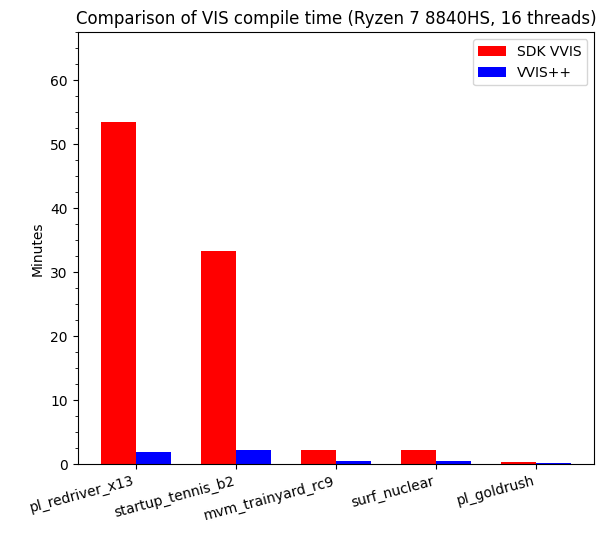
- Huge performance improvement over normal VVIS. Speed up ranges from 50% to 2700% faster (!!)
	- See this benchmark image for a comparison
	- Produces the same results as normal VVIS
- Scales up to 64 threads
- Added appid mounting in gameinfo.txt
- Fixed only first env_fog_controller's FarZ clip distance being considered for radial vis
Wall of Testimonials:
- "wow"
- "I am shocked that my map now compiles in 20 seconds, took 5-10 mins before"
- "from 29 seconds to 16, thats really good boost"
- "im down from a total compile of over 6 minutes to a bit over 1 minutes"
- "its like 5x faster, not just 2x"
- "HOLY FUCK THIS IS SO MUCH FASTER"
- "those time improves are bonkers"
- "this vvis compile went from 20:24 -> 3:40, what the fuck did you put in this thing"
- "This is awesome"
- ":hyenastare:"
- "FROM LIKE AN HOUR TO QUICKER THAN IT TAKES TO MAKE A CUPPA"
- "its so much better lmfao"
- "this used to be over 1 hour total, oh my fucking fuckedy fuck, black magic"
- "portal flow was near instant, no need to fix the nodraw corridors underneath the map, thank god"
- "test compile of well, vvis went from 10 minutes to 1:30, truly amazing stuff"
- "portalflow is about 6 times faster with this"
- "cordon compile to test lighting: 32 minutes, 48 seconds elapsed -> 4 minutes, 51 seconds, this is incredible"
- "ts so juicy dude"
- "You're pawesome"
- "1 hour 12 minutes down to 5 minutes on my map :cracksoldier:, and my cpu isn't even great either"
- "absolutely insane"
- "4:56:30 time elapsed (gmod vvis), 5:43 time elapsed (vis++), i wish i was joking"
- "its great god bless vvis++"
- "From 24 hours to around 20mins. It's amazing. I was getting ready to not have a computer the whole day"
Changelog
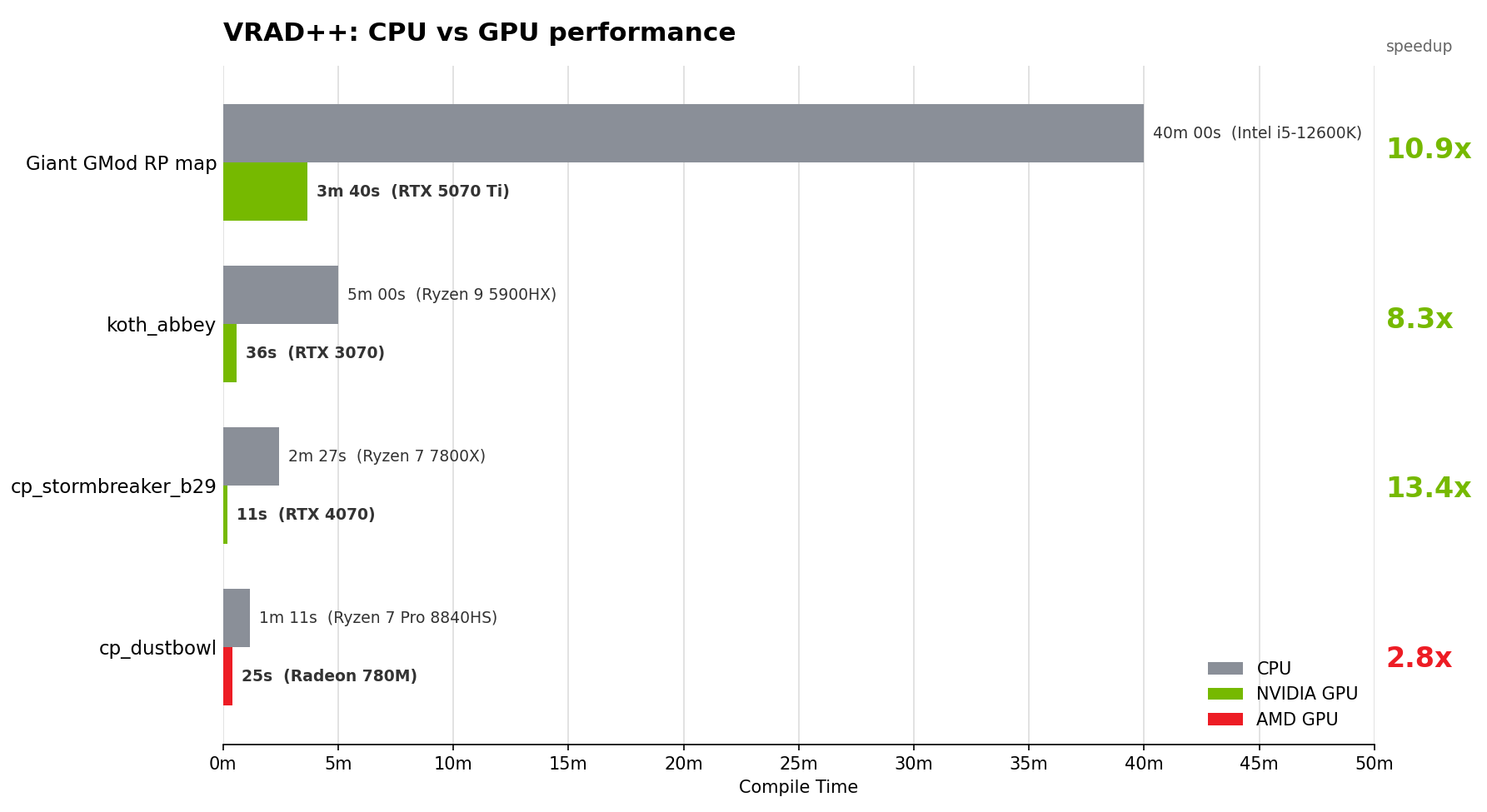
- Added GPU acceleration
	- Enabled by default
	- Depending on hardware, speedups are 3x-40x faster on all maps
	- If your GPU does not support raytracing, VRAD++ will fallback to the CPU
	- Linux AMD only: If your GPU is unsupported, set the env var "RADV_EXPERIMENTAL=emulate_rt"
		- This enables software raytracing emulation, which appears to still be faster than CPU
	- `-cpu` can be used to disable the GPU raytracer if needed
	- Performance and stability will vary depending on how much VRAM your system and map is using
	- Minimum requirements for GPU acceleration:
		- Nvidia: RTX 2000 series or better
		- AMD: RX 6000 Series or Radeon 680M+
		- Intel: Arc A Series
	- Your drivers must support Vulkan 1.3+. Ensure drivers are up-to-date for best stability.
- Scales up to 64 threads
- Small performance optimizations
- Shared LDR/HDR compiling:
	- When using -both, LDR lighting data will be redirected to HDR at no extra file size cost
	- This means you don't need to compile VRAD twice for LDR and HDR users anymore (compatible with both)
	- Passing in -ldr or -hdr will still explicitly compile in LDR or HDR mode only, respectively
	- HDR data will not be remapped if LDR data is already present
	- Therefore if you need different LDR and HDR lighting, compile with -ldr and -hdr separately
		- NOTE: before the 22/10/25 update, VRAD++ would run in HDR mode by Default
		- This has been reverted to stock behavior, with LDR mode being default
		- Only -both will do the data remapping
		- This was done for compatibility with other branches which VRAD++ is being ported to
- Bypassed "numplanes + fakeplanes >= MAX_MAP_PLANES" limit
	- You will never see it again!
- Light count is now unlimited instead of capped at 8192
- Added appid mounting in gameinfo.txt
- Added shadow casting for dynamic props
	- Set "vrad_model_cast_shadows 1" in the entity to enable this
	- This is intended for props that won't move and can't be a static prop, for example resupply lockers in TF2
	- Uses the first frame of sequence 0, or uses the animation set by "DefaultAnim" (like on "prop_dynamic")
	- Modelscale is supported
- Added new "light_projected" light type
	- Behaves like a env_projectedtexture but applied at compile time to lightmaps
	- Same properties as light_spot, with an additional texturename key (path to VTF)
	- Outer angle controls "size" of projected angle
	- Alpha channel is multiplied with the output light (black - no light contribution)
	- Non-square aspect ratios and roll angle are supported
	- Renamed to "light_spot" after compilation so it can be toggled in-game
- Added support for "light_directional" light type
	- Renamed to "light_spot" after compilation so it can be toggled in-game
- Added ambient occlusion baking
	- Custom implementation that is an order of magnitude faster than AO in Slammin/CS:GO (!)
	- Set -ambientocclusion or -ao to enable this
	- Customize with -aoradius, -aoscale, -aopropsamples, -aofacesamples
	- Samples are automatically adjusted for -fast and -final mode
	- Default AO radius and scale is 32 units and 0.5 respectively
	- Radius in 3D sky is correctly scaled (every other VRAD AO implementation has this bug)
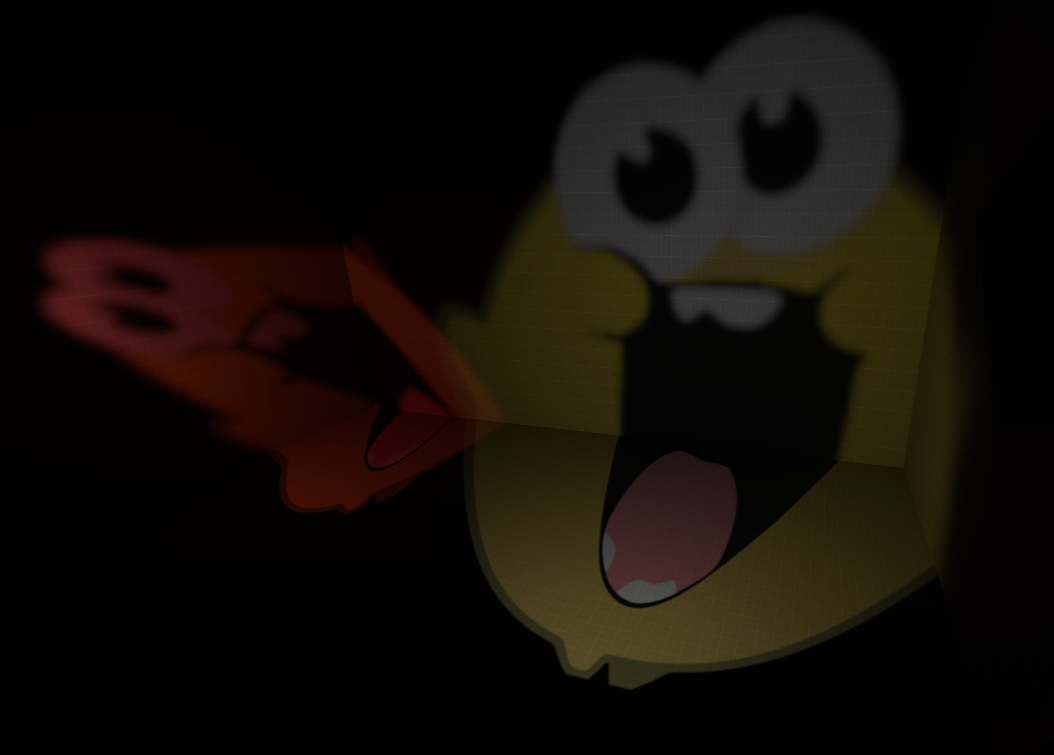
	- Use "-aodebug" to visualize ambient occlusion
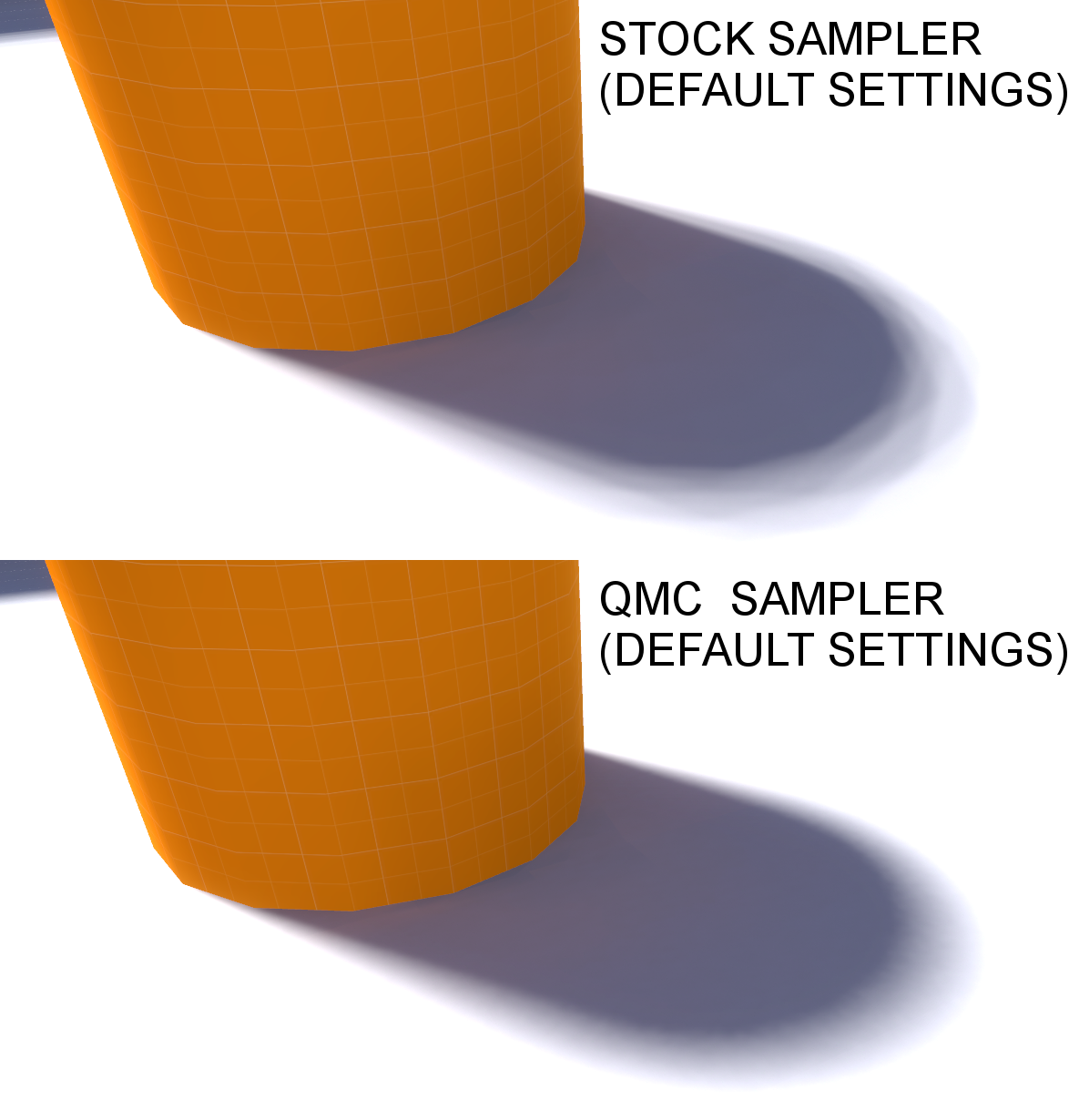
- Added new QMC sampler for ambient, sunlight and ambient occlusion
    - This allows lighting to converage to the ground truth faster
    - Same sampler as used by modern raytracers, such as in Blender
    - Less samples are required for a good result
    - Since less samples are required, "-final" has now been reduced to "-extrasky 8" by default (from 16)
- Added support for lightmap alpha output (for games that support CSM)
	- Use the "-lightmapformat" option to enable this
	- "rgbeastyle3" is what games on CS:GO branch use
- Added support for prop vertex lighting alpha
	- Use "-propalpha" to enable this
	- Writes sun contribution amount to alpha channel
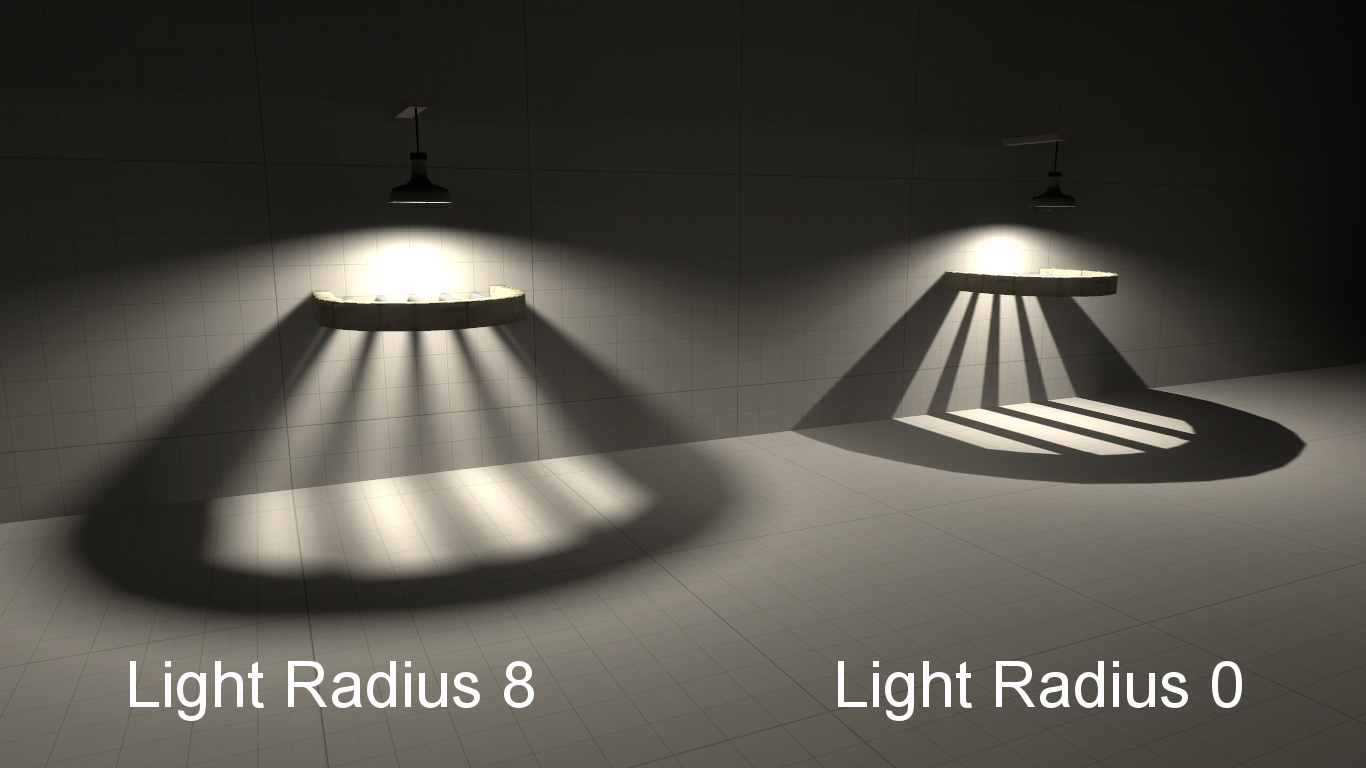
- Added soft lights
    - When "_light_radius" keyvalue on a light is set, the light is treated as a sphere/disk
    - Allows for casting softer shadows
    - Note that soft lights will take longer to compile than hard lights
    - Added "-extrasoft" parameter to control sample multiplier for soft lights
        * Defaults are 1, 0.25 on "-fast", 4 on "-final"
    - Currently only supports "light" and "light_spot"
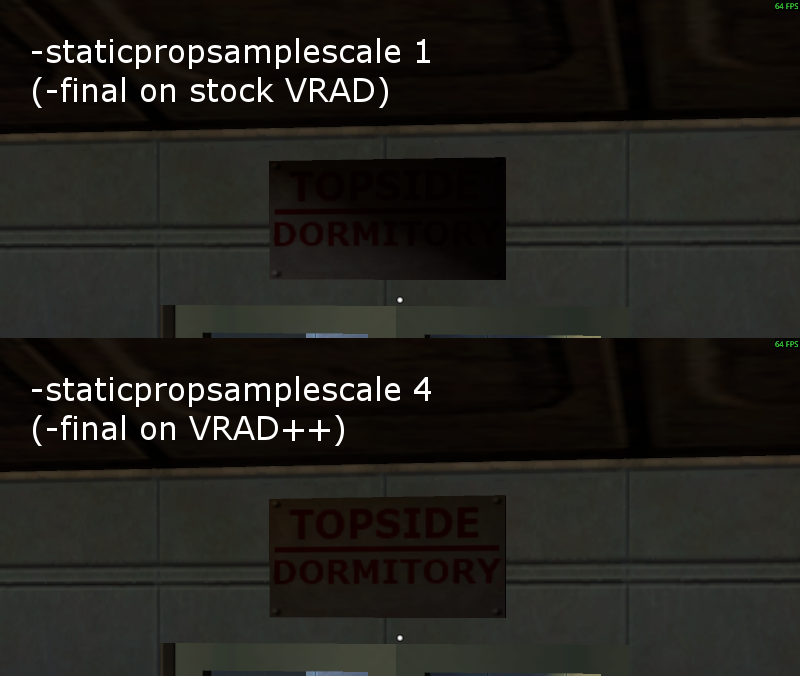
- Added "-StaticPropSampleScale"
	- Controls sample multiplier for prop vertex lighting (default is 1)
	- Defaults to 4 with "-final", which will slightly increase compile times
	- However this will improve quality of prop lighting in areas starved of sunlight or bounced surfaces
- Added -reflectivityscale
- Added -globalreflectivityscale
	- Unlike "-reflectivityscale", this scales bounced light on props and ambient cubes alongside brushes
	- You should always use this instead of "-reflectivityscale" (preserved for compatibility)
- Added -worldtextureshadows
	- Allows $alphatest brush textures to cast proper shadows like props
	- Requires -textureshadows
	- Fixed bug where textureshadows doesn't work if top-left pixel is opaque
- Added -translucentshadows
	- Similar to -worldtextureshadows but for $translucent brush textures
	- Requires -textureshadows and -worldtextureshadows
- Added -forcetextureshadows
	- Forces texture shadows to be enabled on all props
- Added DXT3 and BC7 format support for texture shadows
- Added support for %alphatexture
	- Allows overriding texture used for texture shadows on geometry
- Added supersampling to displacements, which makes them look cleaner with high frequency lightmaps
	- Can be disabled with "-noextradisp" for old behavior
- Added geometric edge pairing for brush entities
	- This helps reduce seams where they touch world geometry or other entities
	- Added "-nopairgeometricedges" option to disable this behavior
	- "vrad_brush_pair_edges" keyvalue can be used to disable this on a per-entity basis
	- Also added "-nopairedges" to disable edge pairing on the same entity
- Added Light Culling
	- Significantly improves performance for open maps that use a lot of lights
	- Greatly reduces lightmap filesize of the map when using named lights
	- Comparison on an open map:
		- 4 minutes 23 seconds -> 3 minutes 1 second
		- File size: 62 MB -> 52 MB
	- "-nolightcull" can be used to disable this if it causes problems
	- "-minlightcullintensity" can be used to adjust the intensity cutoff threshold
	- "-minstyledlightcullintensity" is similar but for named-lights, higher than usual threshold
	- Default is 0.01 which is negligible levels of lighting
	- For named lights, the default is 1 as they increase filesize and lower in-game performance
- Added experimental support for static props to shadow ambient cubes
    - Disabled by default, use "-propambient" to enable
    - Uses collision model of the static prop as the approximation
    - Ambient cubes won't be generated inside solid static props
    - Vertex lighting from the props will contribute to the ambient cubes
        - "-StaticPropLighting" does not need to be enabled
    - Note that this won't solve sunlight applying to entities shadowed by static props, as the engine ignores prop visiblity at runtime
    - See this pagefor detailed info about this issue
- Added experimental support for named "light_environment" and "light_directional"
    - Fixes static props having black lighting
    - To use: you must "jail" the light entity by itself inside a nodraw cube in the void
    - Not doing so will potentially lead to bad performance
    - Named light environment still has engine bugs, mainly that props may have broken light after toggling the sunlight
    - This can be workarounded by flipping the value of "r_radiosity" in console
         - In GMod, Lua can be used for this
         - In singleplayer games, you can issue a command with "point_clientcommand" or VScript
- Added support for "Patch" materials for loadng texture shadows
- Added support for processing L4D2, Portal 2 and HL2 (SDK13 Singleplayer) BSP formats
- Added "-patchlightmapsize" to set minimum lightmap size for patches (default is 16)
	- This controls how faces with lower lightmap scales get subdivided for bounced lighting
	- Lower values will subdivide more, at the cost of increased compile time and memory usage
	- This may sometimes solve issues with thin surfaces obstructed by geometry not receiving light
- Added "-choptexlights"
	- Allows subdivision of faces that have texlights
	- Can create more smoother-looking lights from faces but may take longer to compute
- Added "-fastradial" for using fast radiosity gathering like in "-fast" mode
- Added support for "-LargeDispSampleRadius"
- Added "-dispsamplefactor"
	- Controls radius of lighting influence multiplier for displacements. Default is 1
	- Higher values such as 2.5 or 3 may fix black splotches on very large stretched displacements
- Added "-disppatchsamplefactor"
	- Controls radius of *bounced* lighting influence multiplier for displacements. Default is 1
	- Higher values may fix splotches of dark lighting on large, stretched displacements
	- "-LargeDispSampleRadius" is the same as "-disppatchsamplefactor 2.2"
- Added "-indirectonly" to only bake indirect light
- Added support for using decimals in lightmap scales
- Added support for reading static prop formats v7 to v14
- Added "-report_search_paths" to list current search paths for debugging
- Added "-propdebug" for tracking down what props take a long time to compile
- Added parallel KD tree building, speeds up "Setting up ray-trace acceleration structure..." step
- Added support for VTF 7.6, including CPU compression
- Significantly improved performance and memory usage of bounced lighting on faces with low lightmap scales
- Slightly improved displacement bounced lighting to be more granular
     - Benefits thin/small displacements the most
     - Added "-DisplacementLightingOld" to use old calculations
- Improved vertex lighting for props
	- Added -StaticPropIndirectMode to use old behavior if desired
	- See this page for a comparison
- Improved performance of static prop loading when using "-StaticPropPolys"
	- This also fixes hangs on very large and sparse props
- Texture shadows now have bilinear filtering on GPU for improved quality
- Shushed "too many light styles" warning as it got spammed too much
- Fixed maps with more than 13 million triangles taking a very, very long time to compile
- Fixed black seams appearing on displacements in "-fast" mode
- Fixed rays missing exact diagonal corner intersections
	- Both of these bug exists in all other versions of VRAD
- Fixed prop lightmaps being dumped into wrong color space with "-dumppropmaps"
	- Prop lightmaps are also now dumped into "sp_lightmaps" directory of the game
- Fixed prop lightmaps always using "fast" lighting samples and ignoring "-extrasky"
	- As a result, prop lightmaps will take slightly longer to compile, but will look significantly better
- Fixed maps with radial vis (FarZ set in "env_fog_controller") drawing 3D sky in 2Dsky-only areas
- Fixed light_environment SunSpreadAngle not using more samples under "-final"
    - Maps using a spread angle greather than 0 will take slightly longer to compile with "-extrasky" as a result, but the result looks better compared to stock
- Fixed prop lightmaps causing very, very long compile times on models with invalid UVs
- Fixed "-OnlyStaticProps" crashing
- Redundant vertex lighting is skipped for lightmapped props (saves compile time and file size)
- .dx90.vtx data is loaded for vertex lighting instead of .dx80.vtx
- Broken vertex data for props will now be skipped over when compiling
- VPhysics is now an optional dependency (will compile successfully if its missing)
- Fixed bug where broken vertex data in props skipped vertex lighting for other props
- Fixed oversight where indirect lighting wasn't blended correctly with non-bump vs bump neighboring faces
- Fixed non-deterministic data output in displacement lump
- Fixed textureshadows defined in the .rad file not working if slashes were different
- Fixed rare crash related to surfaceprop parsing
- Fixed multiple "light_environment" or "light_directional" entities stomping over leaf sky flags
- Removed memory column from BSP statistics as its useless
- Named or styled lights are now sorted by brightness priority for faces
	- Reduces occurence of bad lighting from overlapping named/styled lights
- Static prop lighting is no longer skipped on "-fast" mode
- Added -scale, -ambient, -dlight, -sky, -notexscale, -coring debug options
- Unlimited texlight support in .rad files
- Comments in .rad files are now skipped
- Cleaned up formatting of some messages and warnings
Changelog
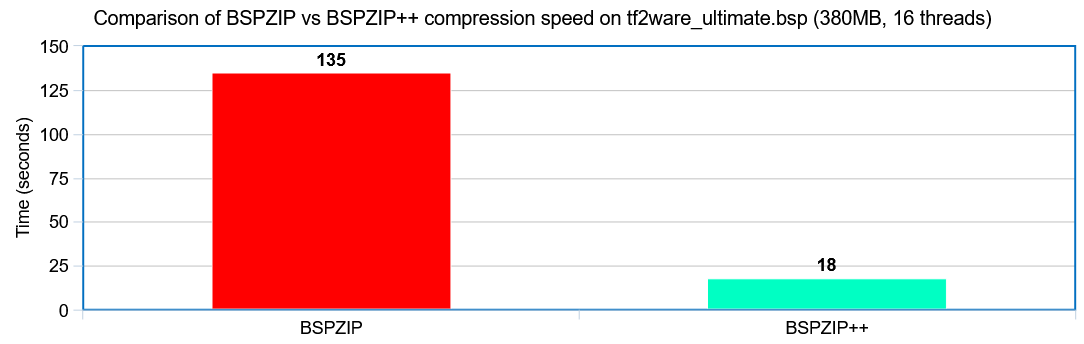
- Multithreaded LZMA compression
    - Threads can be adjusted with "-threads N" parameter
- ".mp3", ".wav", ".ogg", ".ani" and ".vcs" (shaders) files are no longer compressed
    - This prevents caching bugs in the engine
    - See this page for more info
- Supports maps that exceed soft limits such as overlays, lights and entities
- Supports shared LDR/HDR data from VRAD++
    - This prevents map sizes from inflating after packing content
- Supports Garry's Mod
    - GMod's BSPZIP does not support compression (even though GMod's engine can load compressed maps)
    - Now you can use BSPZIP++ to compress maps for GMod
- Supports SDK2013 Singleplayer BSPs
    - Note that compression is NOT supported on the singleplayer engine
- Added "-verbose" flag for more detailed information
- "-game" is now optional for some commands
Changelog
- Significantly faster compilation
- Significantly improved loading speed of SMD files
- Supports compiling unlimited number of vertices and materials
- Raised maximum output file size to 32mb
- Added appid mounting in gameinfo.txt
- Added -nodx80 option to not emit .dx80.vtx files
- Added "reverse" command for $sequence
- Added "pos" and "rot" options to "match" command for animations
- Added "copy" command for animations
- Added basic "if"/"else"/"else if" conditionals to animations
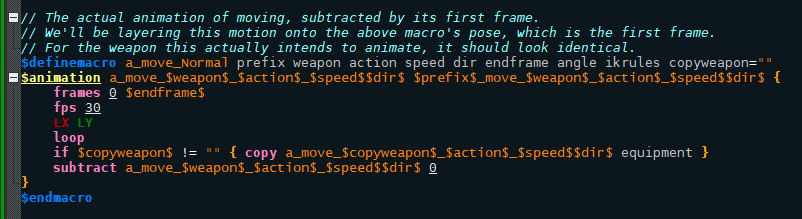
- Added default argument support to macros
- Added new $endmacro terminator for macros, allows omitting \\
- Added numeric input support for "$contents"
- Added better warnings for invalid bounding boxes in animations
- Added "-noremap" to disable sequence remapping with existing models
- Added "$bbox [meshname 1] [meshname 2] ..." to calculate bounding box from specified mesh only
- Added "$setvariable" - similar to "$definevariable" but can override a previous variable
- Added "gmtime" option for "$sequence"s to flag as synced to UTC time
	- Note: this requires mod support
- Added check for overflowing cmdlists
- Added "-cullanims" parameter to remove unreferenced $animations
	- This can significantly reduce file size on large animation sets such as thirdperson animations
	- "nocull" parameter can be added to an $animation to disable culling
- Added warning if duplicate variable is defined via "$definevariable"
- Added error if duplicate macro is defined
- Weight for "activity" is now optional, defaults to -1 if not specified
- Made offset optional for $attachment, can be explicitly defined with "offset" token
- Missing bone name in "$weightlist" is now a warning instead of error
- Raised maximum amount of bones in the SOURCE mesh to 1024 (the output bone limit is still 128)
- $collisionmodel and $replacemodel no longer require explicitly providing extension name
- Unused materials are now removed from the final model (i.e. part of $animations or collision model only)
- Macros now fallback to "$definevariable"s if not found in macro parameters
- Implemented new rules for bone collapsing that prevent unexpected behavior, see below:
	- If bone is marked by $alwayscollapse, its always collapsed no exceptions
	- If bone is assigned to a vertex at any LOD, dont collapse
	- If bone is used as a hitbox, don't collapse
	- If bone is a $definebone, dont collapse
	- If bone is used in an animation, dont collapse
	- If bone is procedural, don't collapse
	- If bone is part of ikchain, don't collapse
	- If bone is used as $attachment, don't collapse
	- If bone is used as $bonemerge, don't collapse
	- Otherwise, collapse
- Fixed $renamebone not affecting the collision model
- Fixed crash if source bones limit is exceeded
- Fixed crash if blank bodygroup was used with $staticprop
- Fixed crash if source mesh had too many vertexes/faces
- Fixed swapped variable names in "missing control bone X for procedural bone Y" error
- Fixed bogus animation data being printed in console
- Reduced default weight culling from 5% to 0.01%
- Removed limit for max number of meshes and animations
- Removed .sw.vtx output
Other tools
VTFEdit++
Upgraded version of VTFEdit Reloaded by misyltoad, Neil 'Jed' Jedrzejewski and Ryan Gregg

Changelog:

- Redesigned, cleaner user interface with Qt, and supports dark theme!
- Implemented .gif animation frame importing
- Added drag and drop importing of textures
- Non-power of two textures can now be created
- VMTs with syntax errors can now be imported successfully
- Default VTF version is now 7.4
- Default indentation in VMT editor is now 4 spaces
- Added document tabs, so multiple textures and materials can be opened at the same time
- Added zooming with mouse scroll wheel, and panning by holding left click
- Added error line highlighting for missing quotes, braces and unquoted vector/matrix values in VMTs
- Added sprite sheet editor for particles, similar to "mksheet" tool. Access it under Resources tab
- Added import presets
	- This allows you to quickly switch between settings for common configurations
	- I recommend using these so your assets are consistent for diffuse, normal maps, icons, etc
	- You can edit the presets, in addition to creating and savingyour own presets
- Added $distancealpha (signed distance field) generation when importing, under Advanced tab.
	- This also uses a new algorithm that is orders of magnitude faster than VTEX!
- Added Hotspot editor for materials with hotspot data/".rect" files
	- See this page for details
	- Can be accessed under "Texture" tab
- Added EXR/PFM/HDR import and export support
	- This now allows creating RGBA16161616, RGBA16161616F, RGBA32323232F and R32 VTFs
- Added support for importing and exporting DXT1A, ATI1N and ATI2N textures (now works correctly in-game)
- Added support for BC7 and BC6H formats (for mods that use DirectX 11), based on Strata Source spec
	- In addition, the extended BC6H_UNSIGNED, BC5 and BC4 formats are supported
- Added support for VTF 7.6 (Strata Source format)
- Added support for aux compression under VTF 7.6
- Added support for NICE filtering in scaling/mipmaps
- Added normal map renormalization, this makes normal map mipmaps/resizing look a lot better
	- This requires "Normal Map" to be ticked when importing
- Added recognition for PCC (Parallax Cubemap) VTF resource
- Added unwrapped view for cubemaps, this can be toggled in options
- Added options to customize font, text size, indentation and color of VMT editor
- Added option to strip alpha channel on import
- Added option to preserve aspect ratio when resizing
- Added quick texture flags to import
- Added multiple of 4 resizing when importing (for DXT formats)
- Added ability to change VTF version of existing textures
- Added line numbers to VMT editor
- Implemented single instance
	- Opening multiple VTFs at once will instead open in a singular VTFEdit instance as tabs
	- This behavior can be toggled under "Options"
- Mipmaps are now shown at full size when previewing, can be toggled under View -> Zoom Mipmaps
- Added framerate slider for animated textures
- When batch exporting, all frames, faces and slices are now exported
- Input/output folder when batch converting can now be manually edited
- Color and alpha format list now only list the formats that actually do or don't support alpha
- Alpha format is now automatically dropped from image if the alpha channel is fully blank, e.g. DXT5 -> DXT1
- Increased max texture dimensions to 16384
- Improved texture flag names, all of them can now be ticked
- Imported textures will now have their name automatically set to the original file's name
- Improved robustness of the VTF parser to prevent crashes from badly-formed/malicious VTFs
- sRGB flag is no longer applied on imports
- Re-ordered the color/alpha formats by common usage
- Fixed sluggish VMT editing
- Fixed crash related to VMT editing
- Fixed stray garbage pixel in bottom left when copying image to clipboard
- Removed WAD support
- Removed filters that weren't implemented
- Removed File System tab

Download (Last updated: 6th September, 2026)

Source Code
Faceposer++
Faceposer++ is a modification of SDK2013 Faceposer with various new features and improvements

Changelog:

- Upgraded to 64-bit process
- Supports LipSinc (IMS) phoneme extraction out-of-the-box
- Upgraded graphics
	- Uses DirectX 9 instead of 8
	- Uses newer Windows UI stylining
	- Antialiasing is enabled
	- Basic material proxies are supported (prevents burn overlays on TF2 characters)
- Improved startup times
- Added MP3 and OGG audio support
- Added support for VPK sounds in phoneme editor
- Added phonemes text file support for MP3/OGG files
- Added reload sounds button in Sound Browser
- Added mouse-based zooming for phoneme editor
- Added shift hotkey scrolling for phoneme editor
- Emotion files from TF2 are now loaded automatically
- Space hotkey now toggles pause in choreo view
- Phoneme editor now zooms in/out faster and uses proportional zooming
- Fixed missing icons (they are embedded in the executable now)
- Fixed stuttery audio playback
- Fixed phoneme editor offset resetting on resize/scroll
- Fixed background color not working
- Fixed crash if speech API did not load successfully
- Fixed crash if a word had no phonemes
- Fixed crash if realigning word with no phonemes
- Fixed crash if pressing flex buttons with no scene
- Fixed crash on shutdown from materials
- Fixed window disappearing from the taskbar on startup
- Fixed active model not changing when switching with Recent Files list
- Fixed model list being loaded in reverse order
- Fixed ground floor not rendering correctly
- Fixed missing materials from the various rendering/control panel modes
- Fixed float precision loss in rendering waveforms at high zoom

Installation:

Place into your game's bin/x64/ folder (where normal hlfaceposer.exe is)
Launch the hlfaceposerplusplus.exe

The only supported games are 64-bit SDK2013-based games, for example:
- Team Fortress 2, Counter-Strike: Source, Day of Defeat: Source, Half-Life 2: Deathmatch
Garry's Mod is NOT supported.

Download (Last updated: 25 June 2026)
Crowbar++
Modified version of Crowbar 0.74 by ZeqMacaw

Changelog:

- Console colors inverted to white-on-black
- More readable console font
- Studiomdl warnings/errors are now highlighted yellow and red respectively

Download (Last updated: 6th August, 2026)
bsp_iidefeat
Tool to recover map textures from the infamous IID nodraw anti-decompile protection on BSPs
Recovers majority of brush textures in the map. A bit of manual cleanup may still be needed.
If you encounter a protected map that does not work with this tool, let me know!

Updated: now supports fully removing "bspProtect" protection by Jakob Sailer.
Updated: now supports removing crashing/junk entities from "BSP Protection" by SpySpaille
Updated 30th September: supports removing latest version of bspProtect
Updated 1st October: supports recovering hint brushes. Pass -nohint to disable this if it causes issues
Updated 3rd October: added -entrecovery option to recover brush entities and lights from entity-stripped maps
Updated 14th October: fixed bugs with light recovery, corrupt lumps are now skipped

Usage: run from cmd to see help options
Download (Last updated: 14th October, 2025)
check_mdl
Python script to check MDLs for corrupted vertex data
There is an unknown compiler bug where models very rarely have corrupt LOD data
Such corrupt models cause client crashes when decals are applied or users have lower graphics settings
This tool can identify those so they can be recompiled
Originally made to identify problematic props in the Greek Theme Pack for TF2

Usage: install Python, run the script inside a folder of models you want to check
Download (Last updated: 9th March, 2024)
cubemap2hdr
Converts a cubemap in LDR color format to HDR
Particularly useful for Left 4 Dead 2 where LDR cubemaps will look broken

Usage: drag and drop a cubemap onto the exe
Download (Last updated: November 11th, 2024)
tga2skybox
Converts 6 tga files into a cubemap VTF, and automatically creates a LDR and HDR version
Applies correction to the edges to blur seams as well
Useful for fake skyboxes with WindowImposter shader

Usage: run the tool and follow instructions
Download (Last updated: 31st May, 2024)
vtf_downscale
CLI tool to downscale a VTF to a lower mipmap losslessly. Useful to reduce file size without re-compressing the texture
Supports mass-automatic downscaling (for example to only downscale all 2048x2048 or higher textures)

Usage: run from cmd to see help options
Download (Last updated: 15th August, 2024)
vtfstripalpha
CLI tool to remove the alpha channel from VTFs without quality loss. Useful to reduce file size
Supports mass-automatic detection and removal of blank (white) alpha channels
Unfortunately, I lost the source code for this tool...

Usage: run from cmd to see help options
Download (Last updated: 24th August, 2022)
proptexelvtf
Converts a prop_static lightmap (.ppl file extracted from BSP) into VTF

Usage: drag and drop a .ppl onto the exe
Download (Last updated: Jan 11, 2021)
vtf_fix_mip2
Removes LOD settings from VTFs
Was useful to make some TF2 textures appear high-resolution, now obsolete as mat_picmip -10 is allowed again

Usage: put the exe into the desired folder of textures and run
Download (Last updated: 13th April, 2021)
dds_to_vtf
Converts a DDS texture to VTF directly without quality loss (automatically chooses closest matching format)
Mainly made this to easily convert textures from IW engine to Source, not tested on many types of DDS files

Usage: drag and drop a .dds onto the exe
Download (Last updated: 6th March, 2024)
file_to_nut
Converts binary file to Squirrel array

Usage: drag and drop a file
Download (Last updated: 22nd September, 2023)
sq
Standalone version of Squirrel language interpreter that supports bytecode disassembly of scripts

Usage: sq -c myscript.nut > myscript.cnut
Download (Last updated: 8th April, 2025)